A sticker that looks great on screen but ships wrong is the worst kind of return. The buyer gets a sheet, sticks one to a laptop, and watches the design get cut in half because the cut line ran through the artwork. They don’t email. They leave a 2-star review.
Sticker file specs aren’t optional. Etsy buyers (and the print-on-demand services they’re using) expect a specific geometry. Get it right once and copy the template forever.
The four zones of a sticker file
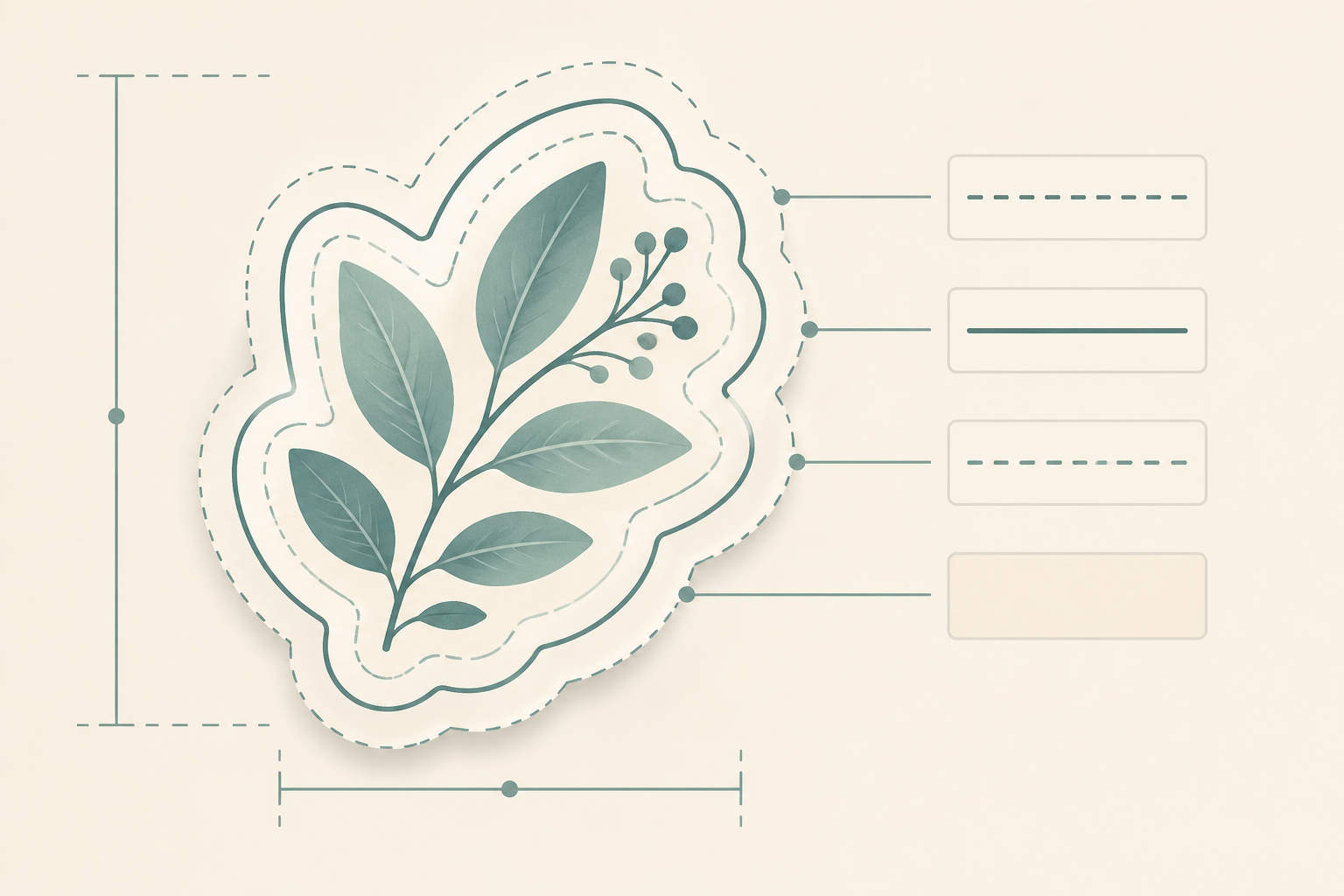
Every printable sticker file has four nested zones:
- Bleed: the outermost area, ~3 mm (1/8 inch) past the cut line. Color and pattern extend into here so the printer can’t cut into white edges.
- Cut line: the actual blade path. This is what defines the sticker’s shape.
- Safe zone: ~3 mm inside the cut line. All critical artwork (faces, text, fine details) lives here. Even if the cut wobbles, nothing important gets clipped.
- Background: the rest of the artwork that fills bleed-to-cut.
A sticker without bleed shows white edges where cuts misalign. A sticker without a safe zone gets text and detail trimmed. Both are fixable in the file before print.
Standard DPI for stickers
300 DPI minimum at print size. Stickers are viewed close-up (on a laptop, water bottle, planner) so DPI matters more than for wall art. 600 DPI is overkill for most printers but doesn’t hurt.
A typical Etsy sticker sheet has individual stickers between 1 and 4 inches on the long edge. At 300 DPI, that’s 300–1200 pixels per sticker. Generate at 4096 × 4096 master files and downscale for the final sheet; you’ll get crisper output than starting at the target size.
Transparent background is mandatory
Every sticker file should ship with a transparent PNG background, no exceptions. Buyers using cutting machines (Cricut, Silhouette) need transparent files to read the cut line correctly. Buyers ordering printed stickers from print-on-demand services also need transparency, as most POD services auto-detect cut lines from alpha channel data.
If you save a sticker as JPEG (which can’t carry transparency), the cutter sees a rectangle around your artwork and cuts a square. Buyers complain. Reviews suffer. Don’t ship stickers as JPEG.
How cut lines actually work
Modern POD services (StickerMule, StickerApp, Sticker You) auto-generate cut lines from your file’s alpha channel. They look at where transparency ends and ink begins, offset that boundary by 3 mm of bleed, and route the cutter along the result.
For Cricut/Silhouette buyers, you provide a separate cut-line file. It’s usually:
- SVG with two layers: artwork + cut path
- PNG + DXF pair: PNG for the printable artwork, DXF for the cut path
- Print-and-cut PNG with built-in registration marks (older Cricut workflows)
Most Etsy sticker buyers in 2026 want the auto-detect workflow (transparent PNG, POD service handles cut lines). Selling separately for Cricut buyers is a small but profitable secondary market.
Sheet vs individual sticker files
Two formats cover most Etsy sticker buyers:
Individual sticker files: one PNG per sticker, transparent background, ready for upload to a print-on-demand service like StickerApp or StickerMule.
Sticker sheets: one PNG with multiple stickers arranged on a shared sheet. Good for buyers who print at home and cut by hand.
The bundle that sells best on Etsy: both formats included. A buyer using POD wants individual files; a buyer printing at home wants the sheet. Selling both formats in one listing maximizes addressable buyers.
File format checklist
For each sticker in the listing:
- Transparent background (PNG, not JPEG)
- 300 DPI minimum at print size
- 4096 px on the long edge for individual sticker files (gives buyers room to scale)
- No white halos around the artwork (alpha channel goes from 100% transparent to 100% opaque cleanly)
- Color profile: sRGB for home printers, CMYK if specifically targeting commercial print
For the sheet view (preview image in your listing):
- All stickers on one PNG with white or gentle off-white background
- Subtle drop shadow under each sticker (sells the “sticker” feeling)
- Sticker positions don’t touch (buyers shouldn’t worry about overlap)
What kills sticker listings
The reviews that hurt sticker shops most are the ones that mention these specific problems:
- “White edges around the design”: missing bleed
- “Text got cut off”: no safe zone
- “The cut line was wrong”: POD service couldn’t auto-detect the boundary, file probably had embedded white background
- “Pixelated”: file shipped at low resolution
- “It’s a JPG, my Cricut won’t read it”: wrong format
All five are fixable in the file before listing. None of them are about artistic quality.
Cut shapes: contour vs kiss vs die
The cut shape signal matters in your listing description. Etsy sticker buyers look for specific keywords:
- Contour cut / outline cut: cut follows the artwork shape with a uniform offset
- Kiss cut: cut goes through vinyl but not the backing paper, so the sticker peels off cleanly
- Die cut: cut goes through both vinyl and backing, individual stickers
- Square cut: single rectangle cut around the design (cheapest, lowest perceived value)
For most Etsy digital sticker listings, you don’t actually cut anything (you ship the file, the buyer prints/cuts). But your listing photos should show a contour-cut preview because that’s what buyers expect to see.
What Elistit makes (and where stickers fit)
Elistit no longer runs a sticker pipeline. The current product types are wall art, clipart, posters, greeting cards, SVG, and custom uploads, all idea-to-listing with print-ready files and Etsy-optimized copy. If you sell greeting cards or invitations, Elistit produces a print-ready 5×7 folded-card PDF at 300 DPI, with the same transparency and resolution discipline this guide describes for sticker files.
The specs above stay useful whatever tool you cut your stickers in: get the bleed, safe zone, DPI, and transparent background right once, and the template carries forward.
Browse all six product types → | See the greeting card generator →
FAQ
Do I need to provide an SVG for stickers? Only if you’re targeting Cricut/Silhouette buyers specifically. Most Etsy sticker buyers are using POD services that work from PNG. Selling SVG separately as a higher-tier listing is a good niche play.
What’s the standard sticker size for laptops? 2–3 inches on the long edge. Much smaller than that and detail disappears; much bigger and they don’t fit common laptop spaces.
Do I need separate files for printable vs cut-it-yourself buyers? Ideally, yes. A printable sheet PNG and individual sticker PNGs cover most buyer needs. The bundle wins.
Why is my POD service rejecting my file? Most rejections are: low DPI, embedded white background instead of transparency, color profile mismatch, or text too close to the edge. Run through the checklist above and 90% of rejections disappear.
What about die-cut shapes (custom sticker shapes)? Most POD services let buyers specify “die cut to shape.” Your file just needs a clean transparent PNG; the service handles the cut path.
Quick questions
Quickly answered.
Q.01Do Etsy sticker listings need to include an SVG file?
Only if you are specifically targeting Cricut or Silhouette buyers. Most Etsy sticker buyers use print-on-demand services that work directly from PNG files. Offering an SVG as a separate higher-priced listing is a good complementary strategy, not a requirement.
Q.02What is the standard size for laptop stickers sold on Etsy?
2–3 inches on the long edge covers most laptop sticker use cases. Smaller than that and fine details become invisible at the actual sticker size. Larger and they will not fit the common areas buyers use: lids, water bottles, phone cases.
Q.03Should I include both a printable sheet and individual sticker PNG files?
Yes, if your listings target both POD buyers and home-printers. A printable sheet PNG serves buyers cutting by hand. Individual sticker PNGs serve buyers uploading to StickerMule or StickerApp. Bundles with both formats consistently outsell single-format listings.
Q.04Why is a print-on-demand service rejecting my Etsy sticker file?
The four most common rejections are: low DPI, embedded white background instead of a transparent PNG, color profile mismatch (CMYK vs sRGB), and artwork too close to the cut edge. Run through the bleed, safe zone, and format checklist and 90% of rejections resolve.
Q.05What is the difference between contour cut, kiss cut, and die cut stickers?
Contour cut traces the artwork outline with a uniform offset. Kiss cut goes through the vinyl but not the backing paper, so stickers peel off cleanly. Die cut goes through both vinyl and backing, creating individual unpeeled stickers. For most digital listings you supply the PNG file; the POD service handles whichever cut type the buyer orders.
Keep going.
Best Image Dimensions for Etsy Listing Photos in 2026
Etsy's actual listing photo specs: file size limits, recommended dimensions, aspect ratio behavior, and how mobile vs desktop crop your photos differently.
Etsy Mockup Standards: What Makes a Listing Photo Convert
The mockup conventions that separate a 1% click-through-rate from a 6% one: composition, scene choice, framing, and the psychology of buyer scrolling.
From Idea to Etsy Listing: A 12-Minute Workflow
The complete idea-to-listing flow that takes most sellers a weekend, broken into the 12 minutes Elistit actually needs.
SVG vs PNG for Etsy Digital Downloads: When to Use Each
PNG raster, SVG vector: which format Etsy buyers actually want, and how to package digital downloads so neither format causes returns.